How
Disclaimer: the core of the following process I’ll try to use as example, is iteration, you know, a communication tool is made to be used in a communicational environment, something that you can’t do by yourself. I don’t have a design team available right now in my pocket, so in the moments where an iteration is needed, I will put an <Iteration> label.
1. Be really aware of the problem
This initial part seems simple, but it can be a little bit more complicated. There are plenty of problems you can recognize when you’re working on a new product’s design. But recognizing a problem is not the same thing that being aware of the problem, because this also means to understand it deeply, in order to know how it will affect the user’s needs, or in other words, it’s not just to know what is wrong with something, it’s also to understand why is wrong, and what is the need we are going to address behind the problem.
Let’s imagine we are working in a chat app. There are plenty of chat apps in the market, so we want to create something different in terms of experience — alert: In this case ‘different’ doesn’t mean just something new, it means an evolution of what the user has right now available — . I’ve ran a simple research using google among the most common complains about chat mobile experiences. I found an interesting one:
“It’s difficult to jump between active conversations” — Someone
Why is this interesting? Because none of the most famous chat apps are trying to make the things in a different way in order to give a better experience for this ‘problem’. All of them have the classic system of 2 layers: A list of users, and the individual chats. But jumping between conversations is a very common practice. <Iteration> Once we have the ‘problem’ over the table is time to iterate with your design team, a good started point is trying to answer some basic questions; Is this problem a real problem? How does this complain affect the user’s behavior? How is the user behavior in this specific situation? What are all the variables we need to consider? Do the outcomes be worth the investment of exploring a solution?, etc </iteration> To move on in our example, let’s assume that yes, this is a real problem, that its solution will provide a high value to our product and it will improve the user’s experience.
2. Sketching time!
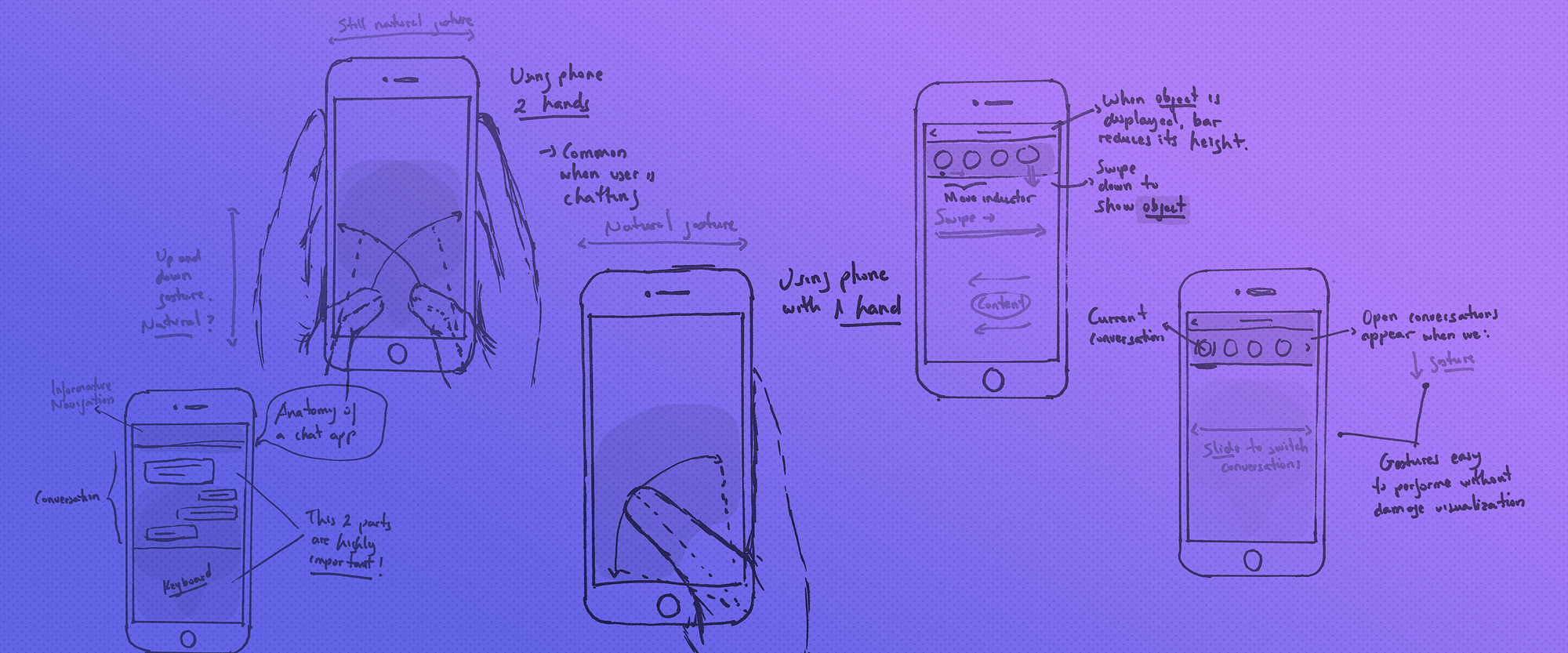
Let’s split the sketching exercise in 2 parts, first I’m going to test through drawings some foundations of the user’s behavior when he/she is interacting with a mobile device, this will provide a context before to sketch possible solutions — sorry for my poorly made drawings btw — .
Reachable areas. Here a common posture using one hand. Notice how the horizontal ‘swipe’ action is a nature gesture.
This is the most common posture when an user is chatting. Here an open question about the up and down gesture.
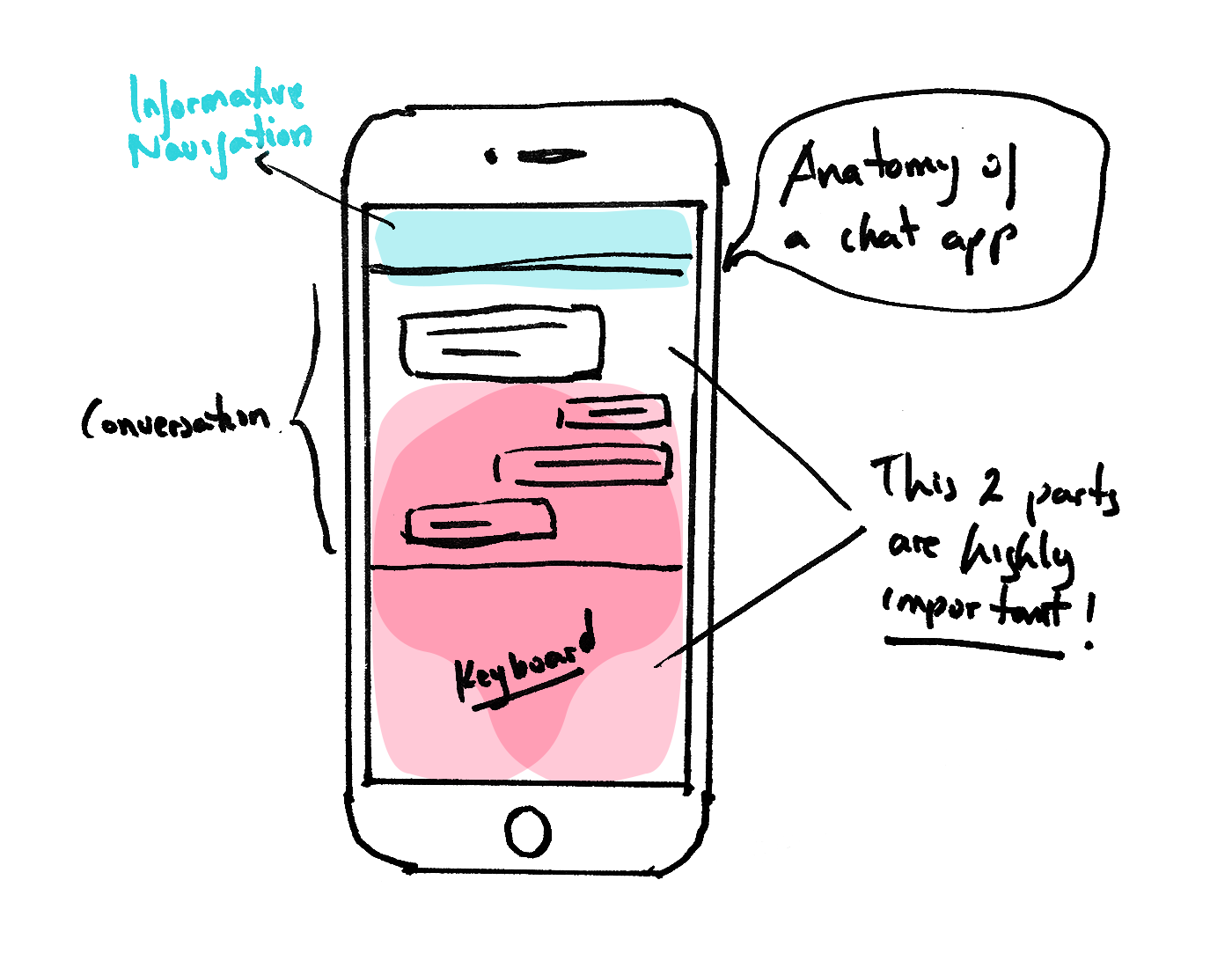
And finally, an analysis of a chat app. Put attention to the red and blue areas.
What I’ve done here is outlining the basic behaviors using a chat app, trying to put over the table more questions: What is the most common position of the user’s hands when is using a phone? When he/she is chatting? Are the current solutions considering this? What are the constraints we need to consider before to sketch solutions?, etc <Iteration> Again, we need more iteration here, not to answer those questions directly, but to generate hypothesis based on them. And that’s the second part:
My selected proposal
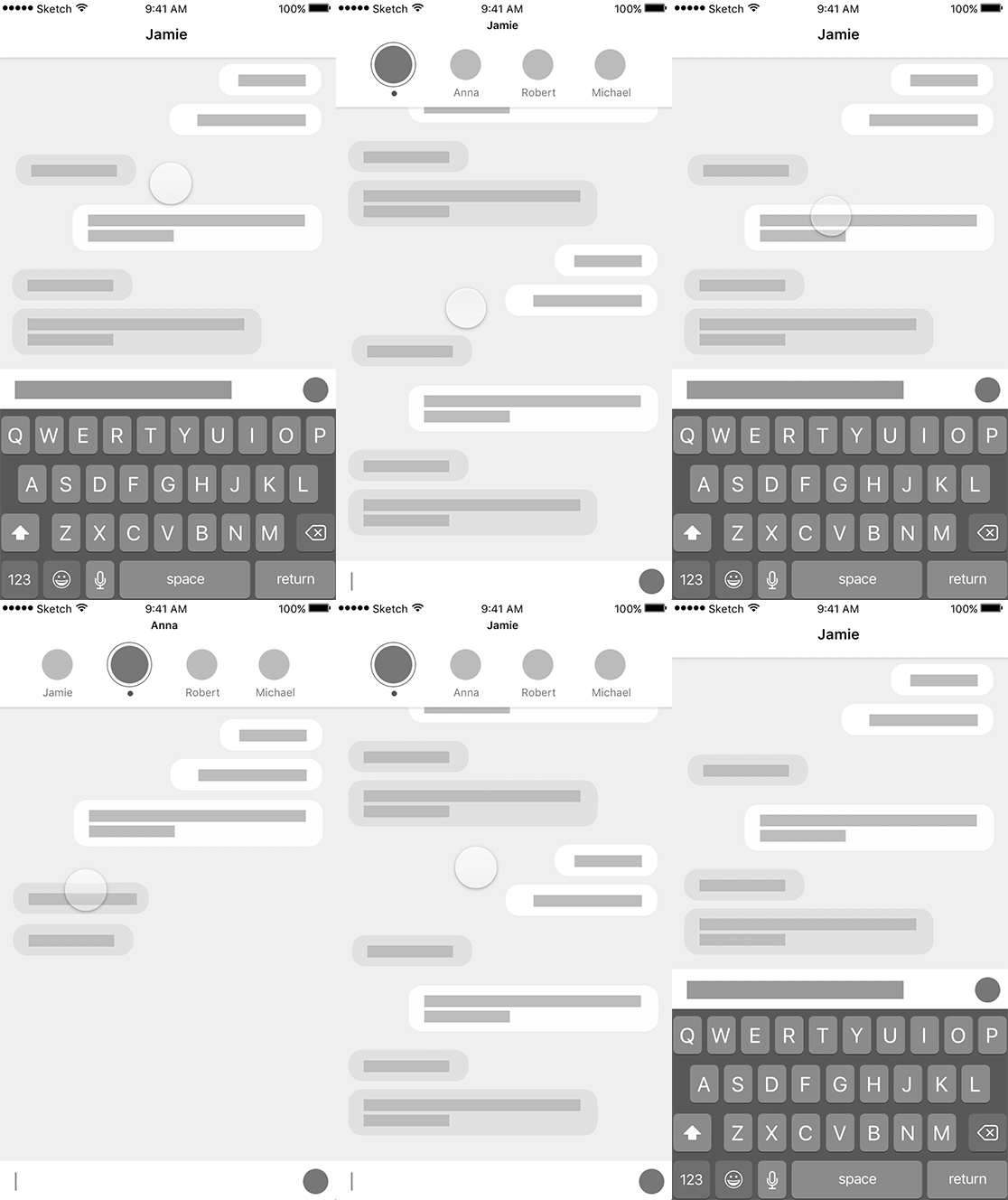
This is my personal proposal; a simple bar at the top that can inform us who are we talking with, and showing us other open conversations in the same screen. Using swipe gestures, we can jump to the next one, like a simple photo gallery. This is just one option after many drawings I’ve made, Why do I choose this one? Because based on the behavior I’ve analyzed, considering the reachable areas and natural gestures, it seems to me the more logical one. The process to make these drawings is easy and quick, or in other words, cheap. This work should be just a very small part of the whole iteration we need to perform among the team, in order to generate a larger amount of possible solutions </iteration>. Nobody is paying me to write this article, so I picked the one personally seems most promising. What option is the most promising? The one that generates more questions! Not because is the craziest one, but questions in a sense that can create the need to be tested ‘in the wild’, in order to clarify the assumptions we are making with our proposals. Here is when the need for an interactive prototype appears and the creation cost of it is justified.
3. Execution
Now is time to build the prototype. I’m going to use Framer because is the tool I’m most familiar with, and considering its features, it allows me to do it relative quick. Before to jump there, I need to have accurate instructions to not waste time coding. So this is the plan:
Ok, now the idea is clearer — at least for me, as I said, I’m working on improving my drawings — Now I can imagine in my head how to code it. I’m not going to dive into each line of code, mainly because I’m not an expert in CoffeeScript and I’m ashamed of my code. But if you want to see it personally, here you can download it from my GitHub.
And.. (drumroll), here is the result:
A little demo of the animation
Here the Framer prototype.
I know, a little disappointing, isn’t? Maybe you expected a finished design. I could do it easily, not because I’m a very skillful designer, but because I don’t have a interesting life and I prefer to spend my weekends doing stuff like this — you’re welcome — . But that’s not the point. This is a dangerous area; when we are prototyping interactions in order to get UX conclusions, very often our inner visual designer appears. If our objective is to work on UX, UI design doesn’t help at all, because it’s distractive. Don’t get me wrong, a good UI design is important, it complements the UX and adds huge value to it. But if our objective is to test a behavior, it’s in our hands to drive the focus towards to it, making the prototype as simple as possible. Do you remember the sketch principles? This is the time to apply them.
Anyway, just for fun and to show you the secondary use of a interactive prototyping as a way to communicate requirements, let say we’ve completed the whole design process, this prototype has passed for all the iteration sessions and have reached a point where we’re all agree this is the solution to code (warning: It doesn’t mean this should happen, actually if something like that happens, we’ve done the things wrong). Applying UI design, it could look like this:
Here the Framer code. You can see more in my Dribbble!
4. Simulating the experience
You could think that’s it but we are not yet. What I’ve built is just a tool for a simulation, now we need to experience the simulation. One of the reasons I’ve used framer, it’s because Framer gives us the opportunity to easily run a test in our phones, as a real app. We need to do that, we need to play with it. Not one time, not just few minutes, not just us. There are different protocols to evaluate a testing phase, it depends on many factors, but in this case let’s do the things simple. I’ve used this prototype for 3 days. Once I had the need to send a message to someone using other apps, I also opened this prototype and played with it. When I’ve been chatting with more than one person at once, I did the same. The idea was to manipulate the prototype under the same environments and circumstances than when I have a real need to chat. This is just a simple protocol, but if you’re working in a bigger product, which involves a larger audience, it will worth to write a more detailed one, with specific metrics to be able to measure the results. I also recommend to record the manipulation of the prototype. Keep in mind that we are not evaluating how the solution works, we are analyzing how the solution works for the user.
A brief recording of a person using the prototype
Step 4: Results
As I mentioned, there are a lot of metrics we could outline to measure results, in this case what we are trying to answer is a simple question: Does it work better than the current approach? But, we are not looking for a Yes or No answer, because is not the answer what it matters, is the amount of conclusions and content we can generate based on the question I’ve put over the table. Probably this is the second time where iteration is highly important. At the beginning we had iterated in order to set the problem and to generate a large amount of possible solutions, now we need to iterate in order to analyze the result of the simulation experiments. What is the user reaction to this new behavior? Is it an improvement? What risks we can notice? What are the improvements we need to do?, etc.