When was the last time you shared something in an app? How did you share it? Who did you share it with? Do you share things often? For the second edition of #FeatureCrushFriday I’m exploring yet another unsung feature- sharing. Seeing as I’m an iPhone user, I’ll be focussing on iOS apps.
Sharing experiences has long been an obsession of mine. Across a variety of projects, I’ve heard consistent feedback during user testing that people don’t generally share. I’ve been surprised to hear a lot of users admit to just texting screenshots, seeing that as the easiest option. I’ve also seen a lot of users struggle to simply find or identify the default iOS share icon when displayed without a label. Is there a problem with the experience? Or do people just not want to share?
Regardless of content, a good sharing feature serves to keep the user in the app, control shared content, and expose possible new users to your product. Sharing features tend to focus on the following services:
- Sharing to other apps
- In-app sharing
Sharing to other apps
Like Medium, most apps use the iOS native share sheet. This makes sense: the native share sheet is easily implemented and highly functional. Users are able to share data to a wide variety of other apps without leaving the current app. Since the native share sheet is the most widely used way to share, users should be familiar with how this works. However, showing only the native share sheet has a few drawbacks. The apps shown to the user on the native share sheet are customizable by the user; depending on current share settings they may not quickly see the app they want to share to. Apps that use the native share sheet also have no way to know whom the users are sharing to.
Google Trips handles sharing through a custom email share sheet. By removing the choice of how to share, the user is brought to a sharing experience more quickly. Custom experiences like this also allow users to share via email regardless of which email app they normally use. I especially like the copy that Google Trips includes in their share sheet: “Recipients will receive an email including all details of every reservation for this trip. They’ll also be able to see these details in Google Trips.” Unlike the native share sheet, custom email share sheets are aware of whom the users are sharing to. For example, users can receive push notifications about shared content and immediately view it in the app.
However, restricting users to sharing via email makes it difficult to share in ways they might prefer such as text messaging. Also, for the feature to work well, users must allow the app to access their contacts. Depending on what service your app provides, some users may be hesitant about giving this permission. Google Trips gets around this because you have to sign into your Google account to use the app.
Airbnb uses both a custom share sheet and a native share sheet. When a user taps the share icon, the custom share sheet appears, highlighting sharing on apps that they know their users share to most frequently. If 95% of your user base prefers to share on Pinterest and Messenger, why not surface those first? The native share sheet is accessible through tapping “More” at the bottom. Also shown is a thumbnail image that reinforces what information is being shared. Although Airbnb doesn’t take advantage of it here, this screen could link to a custom email share sheet.
In-app sharing
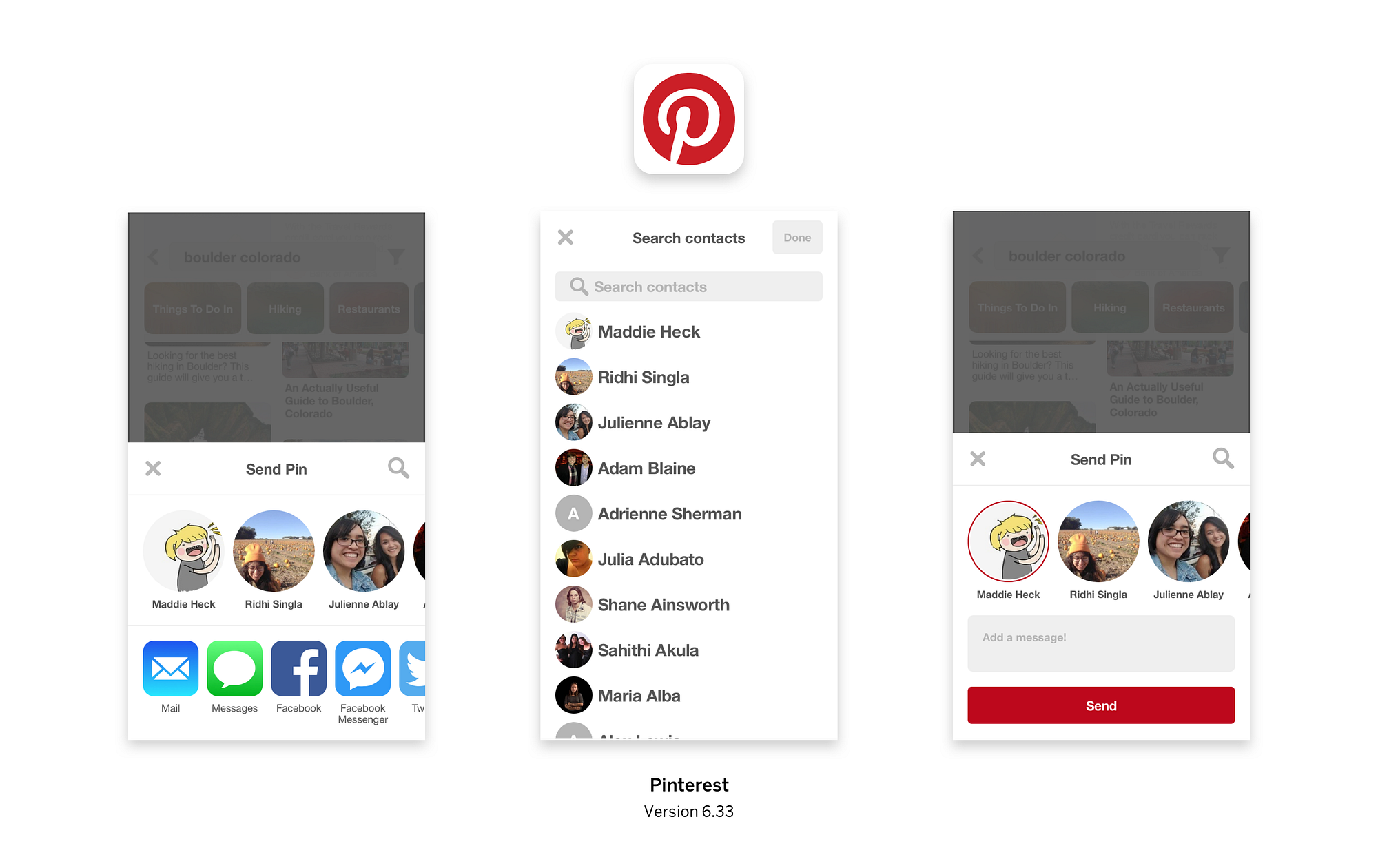
In general, social media apps tend to have custom, more complex sharing experiences. Instagram and Facebook are unique in that they focus on in-app sharing. When I’m on Instagram, I’m mostly sharing posts to other people on Instagram, not to other apps. Since 2015, Instagram has handled in-app sharing through messaging, similar to Pinterest and Tumblr. Unsurprisingly, these apps all have a login wall, meaning that users of the app are required to create accounts. Spotify used to use in-app messaging for sharing but the feature was deprecated earlier this year due to low engagement.